CorporateGift Is Now in the HiBob Marketplace
Your employee data is already in HiBob. Now it can power your entire gifting and recognition program.
We're excited to announce that CorporateGift is officially live in the HiBob marketplace. If your team runs on Bob, you can now connect it directly to CorporateGift and automate employee recognition across the entire employee lifecycle without a spreadsheet, a manual reminder, or a missed moment.
Why This Matters
HRBPs and People teams spend hours every week on the operational side of recognition: tracking dates, coordinating with managers, chasing down shipping details, and making sure no one slips through the cracks. That time adds up fast, and it pulls focus away from the work that actually requires a human touch.
The CorporateGift x HiBob integration gives that time back. Automated campaigns run reliably in the background, so gifting stays personable and consistent at scale without the manual overhead. Fewer shipping errors, no missed milestones, and because CorporateGift connects gifting activity to real redemption data, your team can actually see the impact their programs are having.
The CorporateGift x HiBob integration solves that at the source. Your HiBob data does the tracking. CorporateGift handles the rest automatically.
What You Can Automate
Once connected, CorporateGift syncs with your HiBob employee data and lets you build automated gifting campaigns around the moments that matter most.
Trigger events you can automate:
- New hire onboarding
- Birthdays
- Work anniversaries
- Employee milestones
Gift types supported:
- eGifts
- Physical gifts
- Company swag
- Reward experiences
You can filter campaigns by department, work location, employee tenure, or employment status. So if you want to send a different gift to employees hitting their five-year mark in your EMEA offices versus your US team, that's exactly what you can do. Timing is flexible too. Send on the event date, or configure gifts to go out a few days before or after.
How It Works
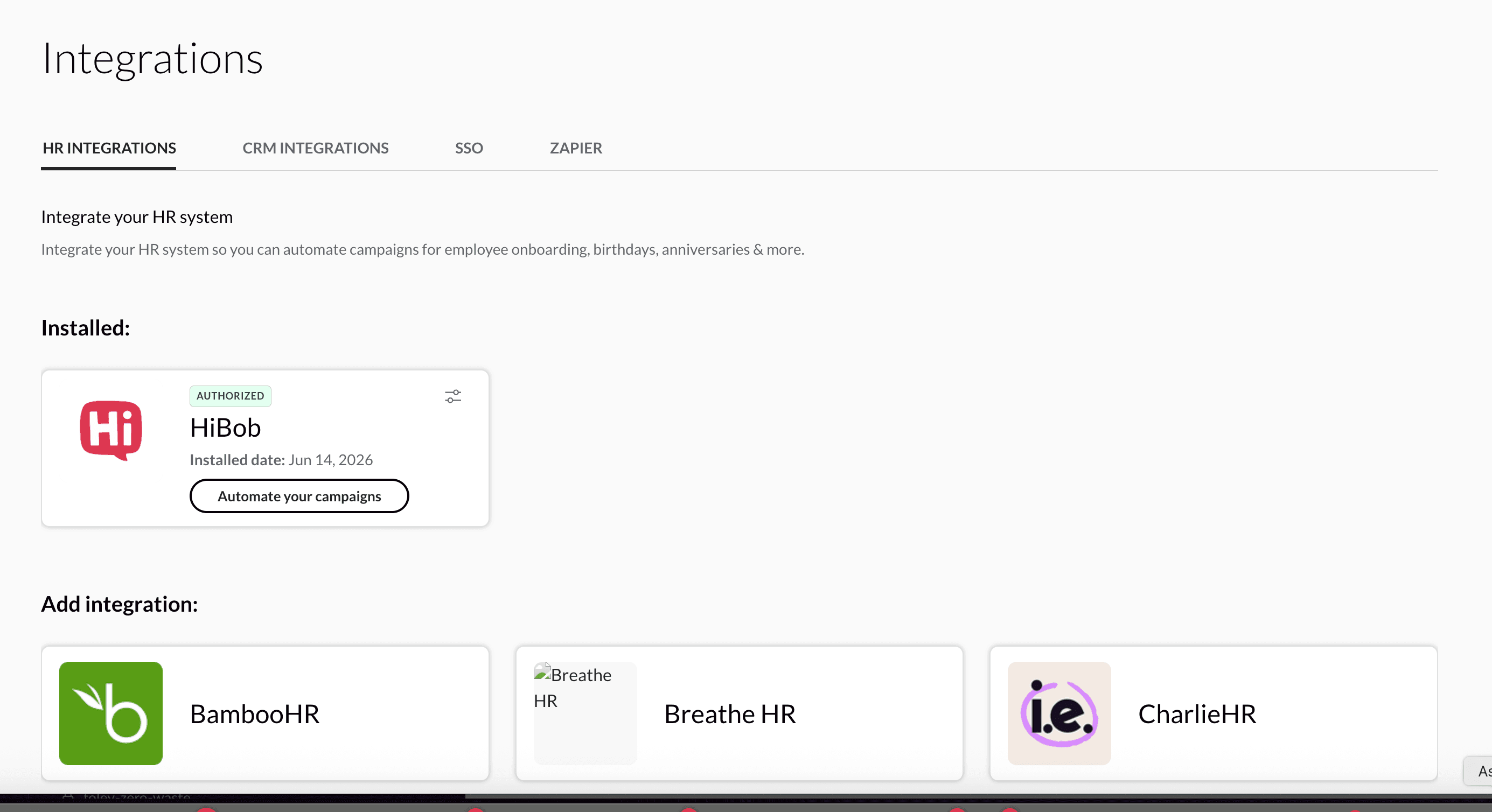
Setup is fast. You connect your HiBob account from the Integrations tab in CorporateGift, authorize the data sync, and build your campaigns from My Campaigns.
CorporateGift then continuously monitors your HiBob employee lifecycle data. When an employee matches your criteria and a trigger event occurs, the gift goes out automatically. No reminders. No manual follow-up. No one falls through the cracks.
The integration is read-only from HiBob's side. CorporateGift only accesses the employee attributes your organization authorizes, like names, email addresses, start dates, birth dates, departments, and locations.
Who This Is Built For
This integration is a strong fit for People and HR teams who:
- Use HiBob as their system of record for employee data
- Want to run a consistent recognition program without adding headcount or manual overhead
- Have distributed or global teams where coordinating gifts across time zones and regions is a real challenge
- Are trying to scale onboarding experiences without losing the personal touch
Get Started
CorporateGift is live in the HiBob marketplace now. You can find us there directly, or connect from within your CorporateGift account under Account > My Integrations.
Full setup instructions are in our HiBob integration guide. Want to see it in action first? Schedule a demo and we'll walk you through it.
Frequently Asked Questions
Does CorporateGift work with HiBob? Yes. CorporateGift has a native integration with HiBob available in the HiBob marketplace. Once connected, CorporateGift syncs employee data from HiBob and uses it to trigger automated gifting campaigns for onboarding, birthdays, work anniversaries, and other employee milestones.
What employee data does CorporateGift access from HiBob? CorporateGift accesses only the employee attributes your organization authorizes during setup. This typically includes employee names, email addresses, start dates, birth dates, departments, and work locations. The integration is read-only. CorporateGift does not write data back to HiBob.
Can I automate employee gifts using HiBob data? Yes. After connecting HiBob to CorporateGift, you can create automated campaigns triggered by employee lifecycle events such as a new hire start date, a birthday, or a work anniversary. You can also filter campaigns by department, location, tenure, or other employee attributes to target specific groups.
What types of gifts can I send through the HiBob integration? CorporateGift supports eGifts, physical gifts, company swag, and reward experiences. Physical gifts require a valid shipping address for the recipient.
How long does it take to set up the HiBob integration? Setup takes just a few minutes. You authorize the connection from the Integrations section of your CorporateGift account, then configure your automated campaigns in My Campaigns. No technical implementation or developer work is required.
Do I need a CorporateGift account to use the HiBob integration? Yes. You need an active CorporateGift account and administrator access to your HiBob account. You can find CorporateGift in the HiBob marketplace or visit corporategift.com to get started.
Can I send gifts to employees in different countries using HiBob? Yes. CorporateGift supports global gift fulfillment. The integration with HiBob makes it especially useful for distributed and international workforces, where manual recognition coordination across time zones and regions is difficult to scale.
What happens when a new employee is added to HiBob? CorporateGift continuously monitors employee lifecycle data received from HiBob. When a new employee is added and matches the criteria of an active onboarding campaign, CorporateGift automatically initiates the gifting workflow on the configured trigger date. No manual action is needed.
Can I send different gifts to different teams or locations using HiBob data? Yes. When building a campaign, you can apply filters based on department, work location, employee tenure, employment status, and other supported attributes. This lets you create customized recognition programs for specific teams, business units, or regions.
Where can I find setup instructions for the HiBob integration? Full installation and configuration instructions are available in the CorporateGift HiBob setup guide.